ThriftAI: Profit Identifier
- 4.7
- Rating
- 100.00K
- Installs
- Free
- Price

 Analysis by App-foxy
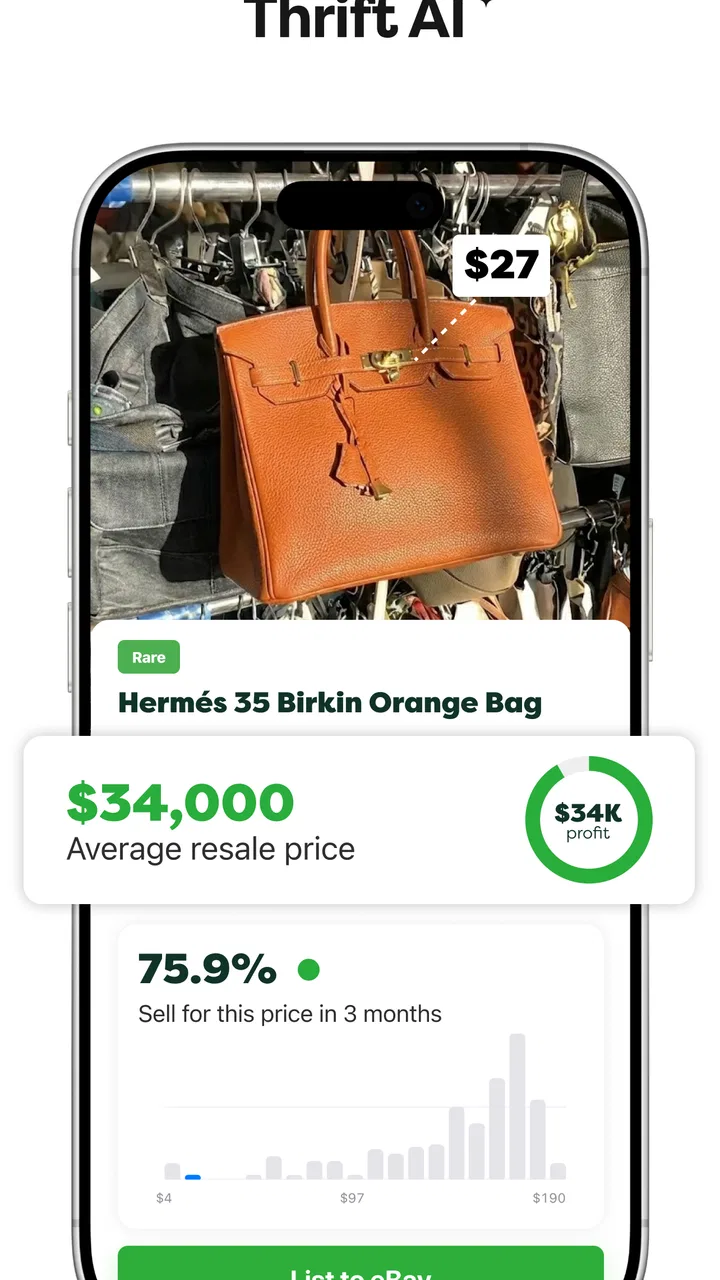
ThriftAI: Profit Identifier is a shopping app built for people who look at secondhand goods and immediately wonder whether an item is worth reselling. I found its central idea easy to understand: instead of relying only on instinct, you use the app’s AI-powered scanning to get a quick sense of an item’s profit potential. That makes it especially interesting for thrift shoppers, flea-market sellers, and anyone building a small resale habit from a phone.
My first impression is that this is not trying to replace the entire resale process. It is more useful as a decision-making tool at the moment when you are standing in a shop, holding an unfamiliar product, and deciding whether to spend money on it. The value is in shortening that first investigation, not in removing the need for judgment. A scan can point me toward an opportunity, but I still need to inspect condition, identify the exact model, estimate selling costs, and decide whether the likely return justifies the effort.
The app comes from smallstack ApS and sits in the shopping category. It is free to install, with optional in-app purchases ranging from around five dollars to around two hundred dollars per item. That pricing detail matters because casual users can try the basic experience without paying upfront, while serious resellers should understand that extended use may involve spending beyond the initial download.
You May Also Like

 AccuWeather: Weather Radar
AccuWeather Review: A Quick, Clear Forecast for Everyday Decisions
For everyday plans, the best forecast is the one you can understand quickly. AccuWeather makes rain timing, radar, and local conditions easy to act on, with a few trade-offs.

 Hill Climb Racing
Why Hill Climb Racing Still Turns Crashes Into One More Run
A tiny car, a bumpy hill and one more upgrade: Hill Climb Racing keeps resurfacing because its simple chaos makes every near-miss feel personal.

 AliExpress - Shopping App
AliExpress Makes Global Shopping Feel Personal, but Shoppers Bear the Risk
AliExpress turns a global marketplace into a pocket-sized discovery engine. Its reach is useful, its shopping loop compelling, and its trade-offs easy to miss.

 Lords Mobile: Kingdom Wars
Lords Mobile Is a Kingdom-Building Routine, Not a Quick Match
A case-by-case verdict on the building, battles, device demands, and social commitments that make Lords Mobile rewarding for some players and exhausting for others.

 PDF Scanner app - TapScanner
TapScanner Makes Paperwork Easier to Capture, Check, and Share
TapScanner makes scanning with a phone feel less like a rescue operation and more like a dependable step in getting work done. Its capture tools are useful, though not flawless.

 Block Blast!
 Shows How Much a Puzzle Game Can Leave Out
A quiet grid game shows why puzzle players increasingly value instant clarity, repeatable skill and low-pressure play—and where the genre still needs to catch up.
More From Our News Desk
View All News


How ThriftAI fits into a real thrift-shopping routine
I use ThriftAI as one checkpoint in a thrift-shopping routine, not as a reason to buy on the spot. Before scanning, I narrow the shelf to items whose condition and asking price already seem worth a closer look; afterward, I decide what needs a manual check or later research. That separation keeps a quick result useful without letting it crowd out the hands-on judgment that makes a resale decision sound.
The useful moment is before you buy
The strongest use case is a quick store-floor check. Imagine finding a camera, a branded jacket, a kitchen appliance, or an old game accessory with a price tag that looks tempting but unfamiliar. Normally, I might search the item manually, compare several listings, zoom in on photos, and try to separate realistic selling prices from optimistic asking prices. That process can take long enough for the opportunity to disappear or for decision fatigue to set in.
With ThriftAI, the intended workflow is more direct: scan the item, read the result, and use it as one piece of evidence. The important habit is to treat the result as a screening signal rather than a guaranteed valuation. A visually similar product may have different versions, regional packaging, missing accessories, or a condition that changes its resale value dramatically. The app can help me decide what deserves a closer look, but it cannot make those physical checks unnecessary.
I would use it most confidently for recognizable consumer products where the label, shape, and branding are visible. I would be more cautious with handmade goods, incomplete sets, obscure regional items, and anything whose value depends heavily on authenticity. Those cases are exactly where a fast scan can be helpful for generating curiosity, but least suitable as the final reason to purchase.
Connectivity changes the pace of the experience
Because the app’s main appeal depends on AI-powered scanning, the network connection becomes part of the practical experience. In a bright shop with stable mobile data or reliable Wi-Fi, the interaction should fit naturally into browsing. In a basement charity shop, crowded market, rural location, or building with weak reception, the same workflow may feel less predictable. I would plan on giving the app a moment to process rather than assuming every scan will be immediate.
This matters more than it might seem. Thrift buying is often impulsive and time-sensitive. If I am comparing several items while other shoppers move around me, a delayed response can change whether I continue investigating. A failed attempt also creates a small but real cost: I may need to move closer to a window, switch networks, or postpone the check until later. The app is therefore most convenient when used as part of a connected browsing routine, not as a tool I depend on blindly in every location.
A practical approach is to open the app before entering a shop, make sure my phone has a usable connection, and avoid waiting until the checkout line to begin testing it. I would also keep a manual fallback in mind: photograph the label and item details, note the seller’s price, and research them later if the scan cannot complete. That simple backup prevents a connectivity problem from turning into a rushed purchase.
Using it on a small phone screen
ThriftAI makes the most sense on a mobile device because the camera is already with me while I browse. That convenience is a genuine advantage over a laptop-based research routine. I do not need to carry a separate reference book or leave the shop to start investigating an item. The phone can stay in one hand while I inspect the product with the other.
The trade-off is that mobile speed can encourage shallow decisions. A result displayed on a small screen is easy to glance at and act on, especially when the item looks exciting. I recommend slowing down after the scan and checking the physical object against the result. Read the model number, compare the color and size, inspect included parts, and look for damage that a camera-based assessment may not capture clearly.
Lighting is another everyday consideration. Thrift stores often have reflections, dim corners, crowded shelves, and plastic packaging that interferes with a clean image. I would move the item into better light when possible and frame the identifying details rather than taking a rushed picture from too far away. This is a small technique, but it can make the difference between scanning a meaningful product label and scanning a confusing shelf scene.
The app is also better suited to selective checking than to photographing every object in a large store. If I scan too broadly, I risk spending more time collecting possible opportunities than actually evaluating them. My preferred routine would be to shortlist items by condition and purchase price first, then use the scanner on the few that appear promising.
What to do when a scan does not settle the question
A useful result should lead to a second step, not end the investigation. If the app suggests that an item may have profit potential, I would verify the exact identity manually. For clothing, that means checking the size, fabric, label, wear, and any flaws. For electronics, I would look for the model code, power requirements, accessories, and signs of damage. For collectibles, I would inspect markings, completeness, and authenticity clues.
This is one of the most important trade-offs with an AI-assisted shopping tool: speed improves the first filter, while accuracy still depends on the quality of the information being scanned and the care of the person using it. A positive scan can be wrong for a cheap reason, such as confusing a similar model or overlooking a missing component. A weak scan can also undervalue something unusual that a specialist would recognize.
If the app gives me an unclear or unconvincing result, I would not treat that as an automatic “no.” Instead, I would record the item’s details and decide whether it deserves slower research. This is especially useful when the purchase price is low and the item is easy to store, but less sensible when the item is expensive, bulky, fragile, or difficult to test.
A realistic weekend example
Suppose I am visiting a charity shop and find a branded audio device priced modestly. The casing looks clean, but I cannot tell whether it is a current model or an outdated version. I would first photograph the identifying area rather than the entire shelf, then review the app’s indication. If the result suggests potential, I would check the model number, inspect the cable and controls, and ask whether the shop allows testing.
Next, I would calculate the real decision, not just the apparent resale difference. The purchase price is only the beginning. I would allow for cleaning, packaging, platform charges, delivery, time spent writing the listing, and the possibility that the item sits unsold. If those costs leave too little reward for the work, I would pass even if the scan looks encouraging. This is where my own judgment adds value that no quick identifier can provide.
For a beginner, that workflow is more useful than chasing every promising result. It teaches the difference between a potentially valuable object and a genuinely worthwhile flip. ThriftAI can help create the shortlist, while the final purchase decision should include practical details that only the shopper can verify.
Who will get the most from it
I think the app is best for new resellers who are still learning which brands, product types, and categories deserve attention. It can make an unfamiliar shelf feel less intimidating and provide a starting point for research. It may also suit experienced sellers who want a fast first pass before applying their own category knowledge.
It is less suitable for someone who expects an automatic profit guarantee. Reselling involves uncertain demand, changing prices, imperfect condition, and selling fees. Anyone unwilling to inspect items carefully may find that the convenience encourages overconfidence. I would also hesitate to recommend making it the main tool for high-value purchases, where authentication and specialist research matter more than speed.
Compared with ordinary web searching, the app’s advantage is convenience at the point of discovery. Manual searching remains stronger when I need to compare completed sales, investigate a niche model, or understand why two apparently similar products have very different values. Compared with relying only on personal experience, ThriftAI offers a useful second opinion. Compared with a spreadsheet or resale calculator, it appears focused earlier in the workflow: identifying whether an object deserves attention before I start recording detailed costs.
Keeping mobile data use sensible
Since the core interaction involves scanning with a phone, I would use it thoughtfully on a limited data plan. I would avoid repeatedly scanning the same item from several angles unless the first attempt genuinely needs improvement. A clear image of the label, logo, or distinctive product shape is usually a better starting point than a sequence of random photos.
I would also separate browsing from deep research. In the shop, I would use the app to narrow the field. At home, on a dependable connection, I would review notes, check condition, and calculate whether the item is worth listing. This division keeps the connected mobile session focused and reduces the temptation to turn every shopping trip into a long research session.
Privacy-conscious users should apply the same common sense they use with any camera-based shopping tool. I would frame only the product and relevant identifying details, avoiding people, receipts, addresses, or unrelated documents in the background. That is good phone hygiene and also improves the quality of the scan by keeping the subject clear.
Version, access, and everyday expectations
The current version is 1.0.69, and the app is available for devices running Android 8.0 or later. That gives it a broad reach among Android users, including people who do not own a recent flagship phone. Still, camera quality, processing speed, screen size, and network performance can vary considerably between devices, so I would not assume the experience feels identical on every handset.
It is rated for Everyone, which fits the straightforward shopping purpose. The app has reached over one hundred thousand installs and holds a 4.7 average from around eleven thousand ratings, with several hundred written reviews. Those figures suggest that the concept has attracted meaningful interest, although popularity does not remove the need to judge whether its scanning style fits my own buying habits.
The free entry point is helpful for experimenting, but the optional purchase range deserves attention before committing to regular use. I would begin cautiously, learn what the free experience can do for my workflow, and only consider paid options if the time saved is genuinely improving my decisions. For a casual shopper, paying for more capability may not make financial sense. For someone who regularly sources inventory, it could be easier to justify, provided the results are consistently useful in the categories they buy.
Where I would draw the line
I would skip this app when the item’s value depends mainly on expert authentication, subtle condition grading, or a highly specialized market. I would also avoid using it as the sole basis for buying anything that would be costly to return, difficult to ship, or risky to store. In those situations, a specialist community, detailed manual research, or an in-person expert opinion is the better option.
Connectivity is another reason not to make it indispensable. If I am shopping somewhere with unreliable reception, I would treat the app as a convenience rather than a requirement. A prepared note-taking system and later research can be slower, but they are more dependable than forcing a scan when the network is struggling. The best users will build a fallback routine instead of assuming the phone will always deliver an answer at the exact moment they want one.
My overall view is positive, with a clear condition: ThriftAI works best as a fast filter inside a broader resale method. It can help me notice possibilities that I might otherwise overlook, particularly when I am new to a product category or need a quick check in a busy shop. Its mobile format is practical, but the experience is naturally more comfortable with a stable connection, good lighting, and enough time to verify the result.
The smartest way to use it is to let the scan decide what deserves investigation, never what deserves an automatic purchase. That mindset keeps the convenience while protecting against the most common resale mistakes. If you enjoy thrift shopping, want help building product recognition, and are comfortable doing the final checks yourself, this free shopping app is worth trying. If you need guaranteed valuations, specialist authentication, or a fully offline workflow, I would choose a more manual approach instead.
For my purposes, ThriftAI: Profit Identifier is most valuable in the few seconds between spotting an item and deciding whether to pick it up. It does not replace experience, but it can make that experience easier to build. With realistic expectations about connectivity, mobile limitations, data-conscious scanning, and the optional purchase costs, it becomes a practical companion for selective secondhand shopping rather than an unrealistic promise of effortless profit.
FAQs for ThriftAI: Profit Identifier
01What features does ThriftAI: Profit Identifier offer?
ThriftAI: Profit Identifier provides a suite of tools designed to help users track and manage their financial activities. Key features include expense categorization, profit tracking, and personalized insights. The app also offers real-time alerts for unusual spending patterns and integrates with multiple financial platforms to provide a comprehensive view of your financial health.
02Is ThriftAI: Profit Identifier secure to use?
Yes, ThriftAI: Profit Identifier employs advanced security measures to protect your data. The app uses encryption protocols to safeguard your information and adheres to strict privacy policies. Additionally, it requires user authentication for accessing personal data, ensuring that only authorized users can view sensitive information.
03Does ThriftAI: Profit Identifier support multiple currencies?
Absolutely, the app supports a wide range of currencies, making it versatile for users around the globe. Whether you’re managing finances in dollars, euros, yen, or any other currency, ThriftAI allows seamless tracking and conversion, ensuring that your financial data is accurately represented no matter where you are.
04Can I integrate ThriftAI: Profit Identifier with my bank account?
Yes, ThriftAI: Profit Identifier offers integration with numerous banks and financial institutions. This allows for automatic syncing of transaction data, which simplifies the process of tracking expenses and income. Users can also manually enter data if their bank is not supported, ensuring flexibility in how they manage their finances.
05Is there customer support available for ThriftAI: Profit Identifier?
ThriftAI provides robust customer support to assist with any issues or questions. Users can access support through the app via chat, email, or phone, depending on their preference. The support team is knowledgeable and responsive, ensuring that users receive timely help to maximize their experience with the app.
Pros
- User-friendly interface for quick navigation.
- Accurate profit calculations for sellers.
- Integrates seamlessly with major platforms.
- Real-time market data updates.
- Customizable alerts for price changes.
Cons
- Limited features in the free version.
- Occasional lag in data syncing.
- Requires stable internet connection.
- No offline mode for analysis.
- Limited support for niche markets.

ThriftAI: Profit Identifier
Gallery